
Guides · November 16, 2026
One domain, a website and your email: how they fit together
Your website and email can use the same domain and still live with different companies. Here is how the pieces fit, what to write down first and what to ask before you buy.

Your website lives at yourbusiness.com. Your email address ends in @yourbusiness.com. It feels like one thing, and it is easy to assume one company runs both. Usually it does not have to. A small business website and email can share a domain name while living with different providers, and that is often the safer arrangement.
It matters the day you change web designers, add a staff member or notice that contact-form messages have stopped arriving. If you know which part does what, none of those days turns into an emergency.
One domain, four separate jobs
A domain name is the name customers recognize. By itself it is not a website and not an inbox. Four services work behind it:
- Registration. Keeps the name registered to you while you renew it. What to check: the account is in your business's name, with recovery details you control.
- DNS. Holds the records that say where to send visitors and where to deliver mail. What to check: you, or someone you trust, can see and edit the records.
- Website hosting. Serves your pages to visitors. What to check: someone is responsible for keeping it up and updated.
- Email hosting. Receives and stores messages for your addresses. What to check: you know whether you have real mailboxes, and who recovers them.
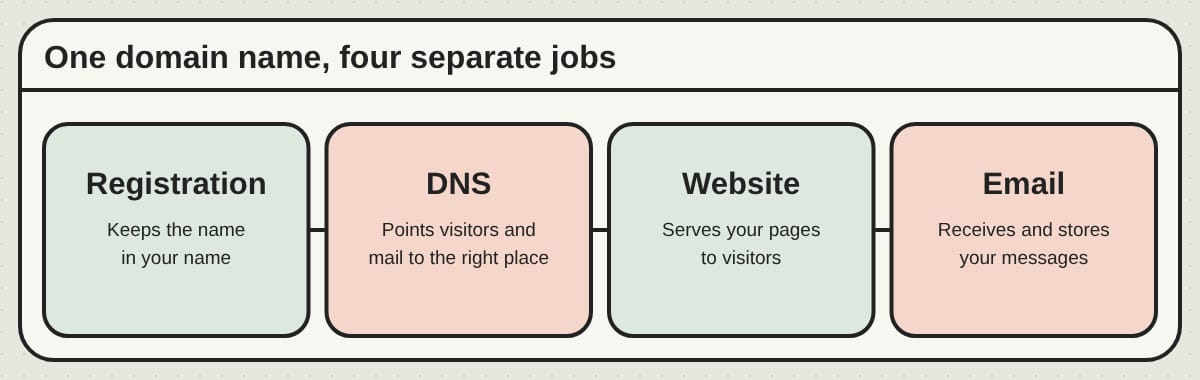
One company can supply several of these, but they stay separate jobs. Your registrar might also run your DNS, a web company might host your site and Google Workspace or Microsoft 365 might hold your mailboxes. A small business website and email work together because the DNS records point each kind of traffic to the right place.
Also remember that owning an address like hello@yourbusiness.com is not the same as having an inbox behind it. Registering a domain does not create one.
Bundled or separate?
A bundle can mean fewer bills and one place to ask for help. It can suit an owner who would rather not coordinate anything.
The catch is that "email included" can mean quite different things: full mailboxes, a limited number of accounts or forwarding addresses that pass messages along to somewhere else. Forwarding is a perfectly good way to receive mail, but it does not by itself give you a mailbox, and sending replies from your business address is a separate setting wherever you read the mail.
Keeping them separate lets you change one without touching the other. You could change who looks after your website and never move a single mailbox. Our guide to bundled website design and hosting compared with separate services goes deeper on that choice.
Before you buy either way, ask:
- Does the plan include real mailboxes, forwarding addresses or aliases?
- How many people can have their own account, and what does each extra person cost?
- Who handles DNS changes, and who looks into it when mail does not arrive?
- Can you keep the domain and export your messages if you leave?
Clear responsibility matters more than having everything on one invoice.
Connecting them without interrupting your inbox
Write down what you have first
Find out where the domain is registered, who runs the DNS and which company receives your email. They may be three different accounts. Take a screenshot or copy of every DNS record before anyone edits anything, and note the mailboxes, aliases and forwarding rules too. A copy of the DNS records does not save the messages inside a mailbox.
If someone else set these up for you, make sure your business has its own login and working recovery details now, before a redesign makes it urgent. Our guide to who owns your domain, hosting and words covers that in more detail.
Point the website and the mail to the right places
Your website provider will give you the records to use, often an A, AAAA or CNAME record for the main domain and for the www version. Use the exact values you are given rather than copying settings from another site.
Incoming mail is directed by MX records, which tell other mail servers where to deliver messages for your domain. Your email provider supplies those values. Cloudflare's explanation of MX records is a clear reference if you want the detail. Create the mailboxes and aliases first, then switch the records, so mail never arrives at a service where its recipient does not exist yet.
If only the website is changing, change only the records the website needs and leave the mail records as they are, unless your email provider tells you otherwise.
Changing nameservers is a bigger step. The nameservers decide which service is in charge of all your records, so if you change them, every record you rely on, including mail and verification records, has to exist at the new place first. Keep the old services running while you test, because DNS changes reach people at different speeds and one check straight afterwards proves little.
Make your mail trustworthy
MX records handle incoming mail. They do not prove that an outgoing message really came from you, and today that proof matters. Your inbox, your contact form and your newsletter tool may all send mail using your domain, and each one needs to be set up to do it properly. Your email provider will give you the steps for three controls:
- SPF: A list of the services allowed to send mail for your domain.
- DKIM: A digital signature that receiving systems can check.
- DMARC: Says what to do with mail that fails the checks, and sends you reports.
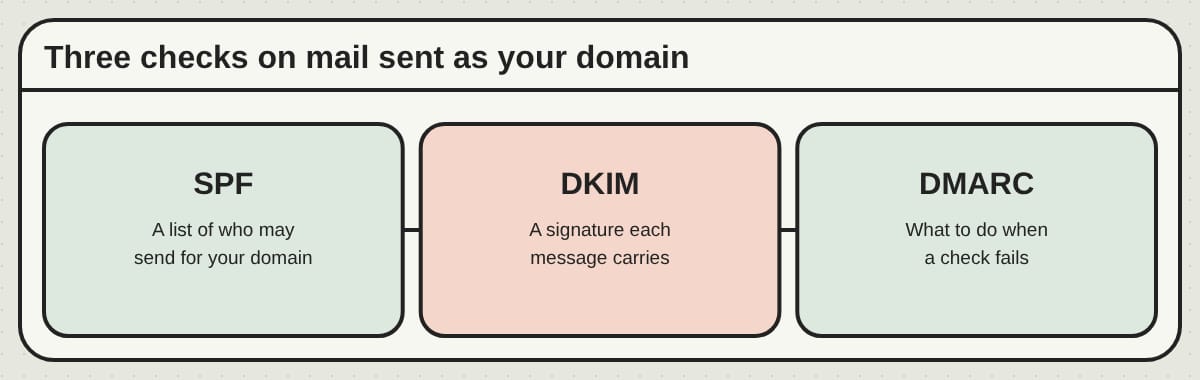
Two things trip people up. First, a domain should have only one SPF record, so when a new tool asks you to add one, you update the existing record rather than adding a second. Second, a DMARC policy of "none" only watches and reports. It does not tell anyone to block failing mail. Move to a stricter policy only after you have confirmed that every legitimate sender passes. Google's email sender guidelines explain the requirements. Authentication lowers the chance of someone spoofing you, though it does not guarantee that a message lands in the inbox.
Finally, protect the accounts behind all this. Turn on two-step sign-in for your registrar, your DNS and your email, give each person their own login instead of a shared password and keep your recovery details current. A padlock on your website protects visitors' connections, but it does nothing for a stolen mailbox password.
Forms and newsletters are senders too
A contact form is one more thing that sends email. A site can look perfect while the notifications quietly fail, because the form's mail was never set up properly. After any change, test the whole trip: fill in the form, check that the message arrives, then reply to it. Look in the spam folder too.
Newsletters work the same way. A newsletter service that sends from your domain needs to be included in your authentication setup, and it is a different job from running staff inboxes, even though the name on the envelope is the same.
Compare the renewal price, not just the opening offer
An introductory price can hide a bigger bill later. Ask each provider for the price after the promotion ends, and for the whole setup you actually need:
- The domain: What is the yearly renewal price, and is privacy protection included?
- The website: What are the ongoing hosting and update charges?
- Email: Is it charged per person, and how much storage does each get?
- Extra addresses: Which ones need a paid mailbox, and which can be free aliases?
- Moving: Is moving a website or old messages charged separately?
- Cancelling: What happens to your files and messages if you leave?
The number of people who need their own inbox changes the total. An alias such as sales@yourbusiness.com can deliver to an existing mailbox, while a new employee usually needs a separate account. As an illustration only, three mailboxes at $8 a month each come to $288 a year, before tax. That is arithmetic, not a quote from anyone. For the wider picture, see what a small business website costs.
Changing providers without changing your address
Your customers should not have to learn a new email address because you changed a vendor. If you keep the domain, you can keep the addresses.
- Moving only the website: keep the current email service running and its records in place, change what the website needs, then test the site, the forms and the inboxes.
- Moving only the email: create the accounts at the new provider, plan what to do about old messages and follow that provider's steps. Update the mail and authentication records at the right moment, then test sending and receiving.
- Moving both: do them one after the other where you can. If something breaks, you will know which change caused it.
Do not cancel the old email service the moment you update the records. Make sure every address works, everyone can sign in and the old messages are where you expect them.
Frequently asked questions
Can I use Gmail with my own business domain? Yes. Google Workspace gives you a Gmail-style inbox on your own domain. A free address ending in @gmail.com is a different thing.
Do my website and email have to be with the same company? No. DNS can send web visitors to one provider and mail to another, and the domain registration can be with a third.
Will a new website stop my email? It should not, as long as the mail records stay correct. Trouble usually starts when nameservers are replaced, or records are deleted, without recreating the email setup.
Where PageTend fits
PageTend's fully managed website service is $99 a month, with no design fee and no contract, and your site is built before you pay. We design it, host it and keep it up to date. Send a change by email or text and it is made within one business day.
Email is a separate matter, and it is worth being plain about where we stop. At go-live we set up forwarding, so an address such as info@yourbusiness.com reaches the inbox you already use. If your email already runs on your domain, we copy your existing records before anything changes so it can keep working, and we ask you not to cancel your old website or hosting until we tell you the new site is live, especially if your email comes from that host. Full mailboxes are the job of an email provider, and which setup suits you is worth talking through before you commit.
Before a project starts, find out who your registrar, your DNS host and your email provider are today. Tell us, and we will talk through what changes, what stays and how we will check that your messages still arrive. You can reach us here.
Rather not do any of this yourself?
We build your website, keep it current and look after your Google listing. You email us; we make the change.
More posts
 Wedding photographer website: a ready-made design or a custom one?A ready-made design can get a wedding photographer online without a blank page. Five checks before you choose, the sameness question, and when a custom design is the better door.
 What a photographer's website should show firstA visitor decides in seconds whether your pictures are what they are looking for. Here is what to show first, how many pictures to show, and what the enquiry form should ask.
 Get your Google Business Profile verified, and what to do the week afterUntil Google confirms you run the business, your listing is only half yours. Here is how verification works, how long it takes, what to avoid while you wait, and what to do the week after.