
Guides · November 3, 2026
What does a website score really mean? How our PageTend Score works
Every Storefront Checkup now opens with a score out of 100. Here is what it counts, why some things weigh more than others, and what a number like 48 tells a business owner.
You can run a free speed test on your website in under a minute, and it will hand you a score. It is a useful number. It is also only about speed, and speed is only one reason a customer does or does not call you.
Most of what costs a local business customers never shows up in a speed test: a phone number you cannot tap, a booking button that goes nowhere, hours that disagree with your Google listing, a home page still advertising last summer's events. A score that ignores all of that can read "good" on a site that is quietly losing calls.
So when we added a score to our Storefront Checkup, we built it around the question a customer is really asking: if I look this business up on my phone right now, can I find them, trust them and reach them? We call it the PageTend Score, and this is how it works.
What the score is
The PageTend Score is a number from 0 to 100 at the top of every Storefront Checkup report. A person goes through your website and your Google Business Profile the way a customer would, and the score adds up what they find. It sits next to three sub-scores, so you can see where the points are won and lost:
- Website, out of 65
- Google profile, out of 22
- Search, out of 13
Under the headline number the report lists every category, with the points you earned in each, so nothing is a black box. Every finding that cost you points is written out in plain words, in priority order, with what to do about it.
What it counts
There are eleven categories. The weights add up to exactly 100, and they follow one rule: the more a problem costs a business when it goes wrong, the more it weighs.
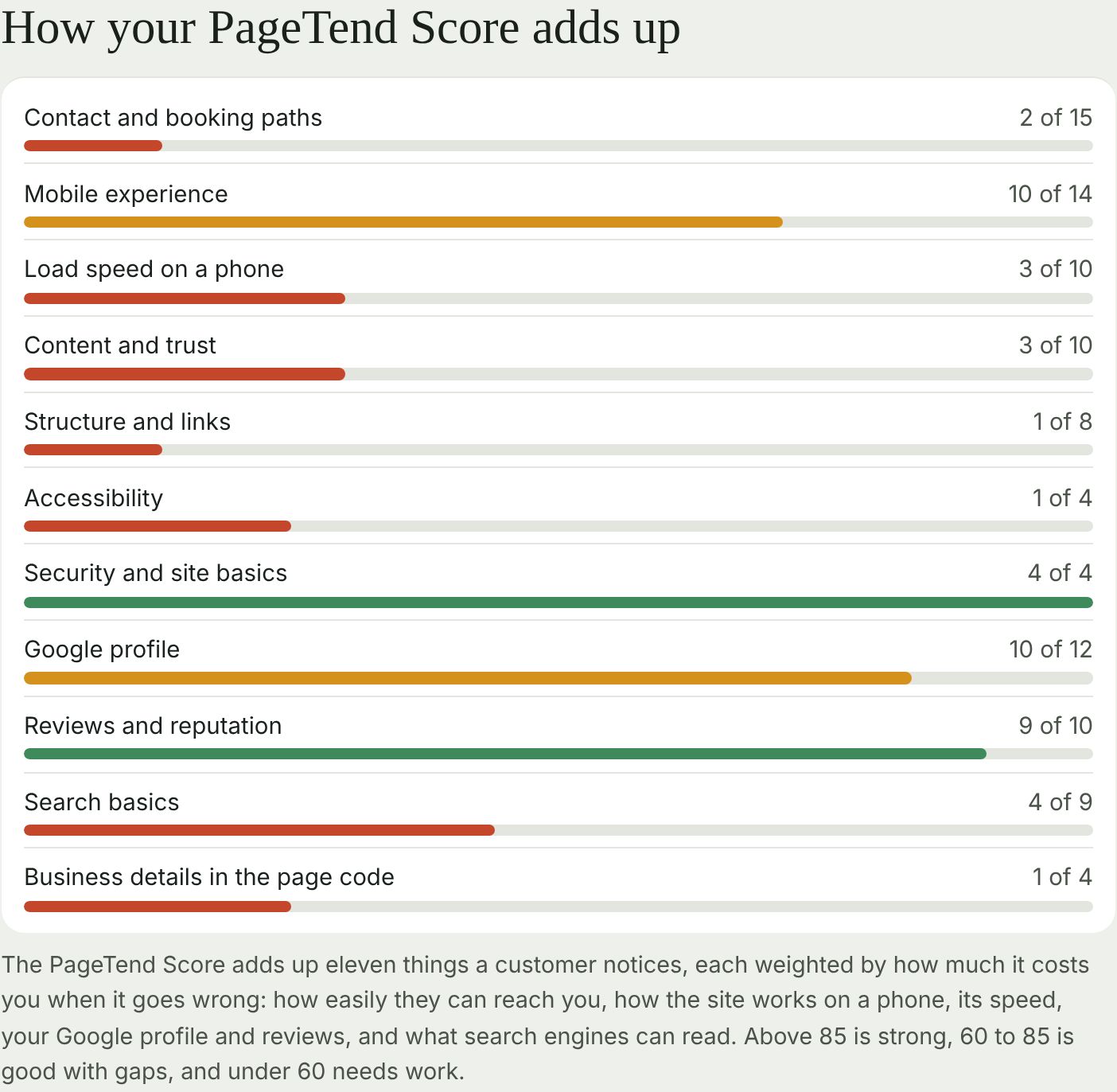
Your website (65 points)
- Contact and booking paths, 15. Is your phone number a link a customer can tap? Is the main action, whether that is Book, Order or Call, easy to see on the first phone screen, and does it work? Does the contact form send? This is the heaviest category on purpose, because a customer who cannot reach you is a customer you lose.
- Mobile experience, 14. Is the site made for phone screens, with no sideways scrolling and no pop-up covering the first screen? Are menus and prices text rather than pictures or PDFs that are hard to read on a phone?
- Load speed on a phone, 10. Measured, never guessed, with Google's mobile speed test.
- Content and trust, 10. Does the first screen say what you do, where, and for whom? Is anything out of date, such as a past event, an expired offer or the wrong copyright year?
- Structure and links, 8. Do your buttons and links go where they say, and can a visitor find contact, prices and booking within two taps?
- Accessibility, 4. Pictures have descriptions, text is readable against its background, headings are in order.
- Security and site basics, 4. A secure connection, and every version of your address landing on the same page.
Your Google listing (22 points)
- Google profile, 12. Is the listing found, with hours, phone number, a link to your website and photos?
- Reviews and reputation, 10. Your rating, how many reviews you have, how recent they are, and whether you answer them.
What search engines can read (13 points)
- Search basics, 9. A page title and description that say what you do and where, and a sitemap with only real pages.
- Business details in the page code, 4. The part meant only for Google: your address, phone and hours, present and correct.
Who adds it up
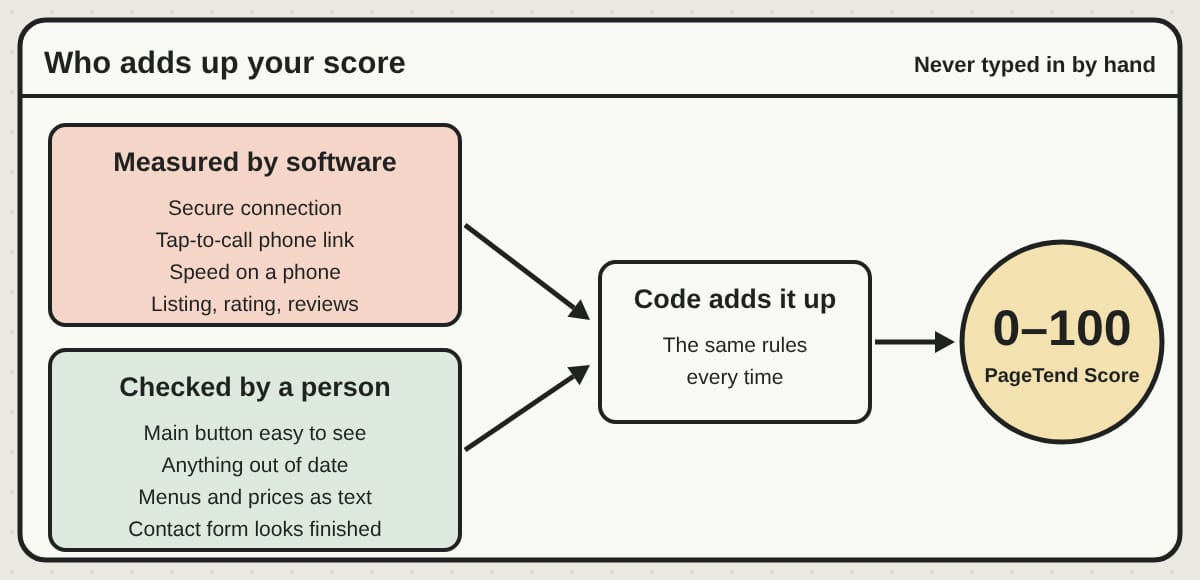
Two kinds of items go into the score. Some are measured by software, such as whether your site uses a secure connection, whether the phone number is a tap-to-call link, and how fast the home page loads on a phone. Those are scored by the same rules every time, and nobody can adjust them. The rest need eyes, such as whether the main button is easy to see, and a person checks those and answers each one.
Either way the arithmetic is done by code. Nobody types a score into a report, which means two businesses with the same findings get the same number.
Two rules keep it fair. If we could not measure something, it is left out and the score is scaled to what we could check, rather than counting it against you. And if something is plainly missing, such as no website at all, it counts as zero, because that is a real gap.
What the colors mean
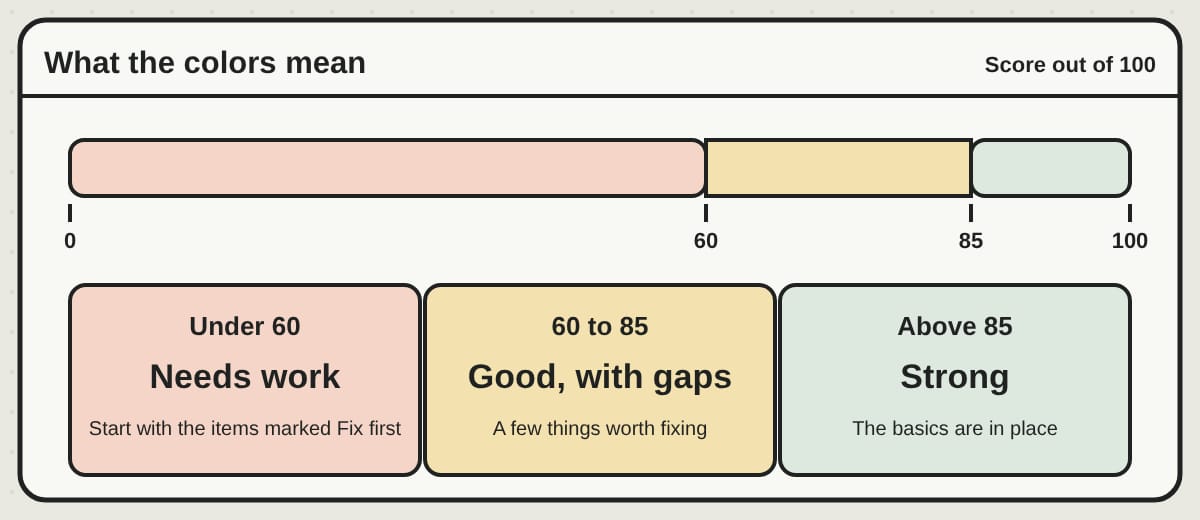
- Above 85, green: strong. The basics are in place and the report is mostly polish.
- 60 to 85, amber: good, with gaps. Customers can mostly find and reach you, with a few things worth fixing.
- Under 60, red: needs work. Customers are getting lost somewhere. Start with the items marked Fix first.
A real example
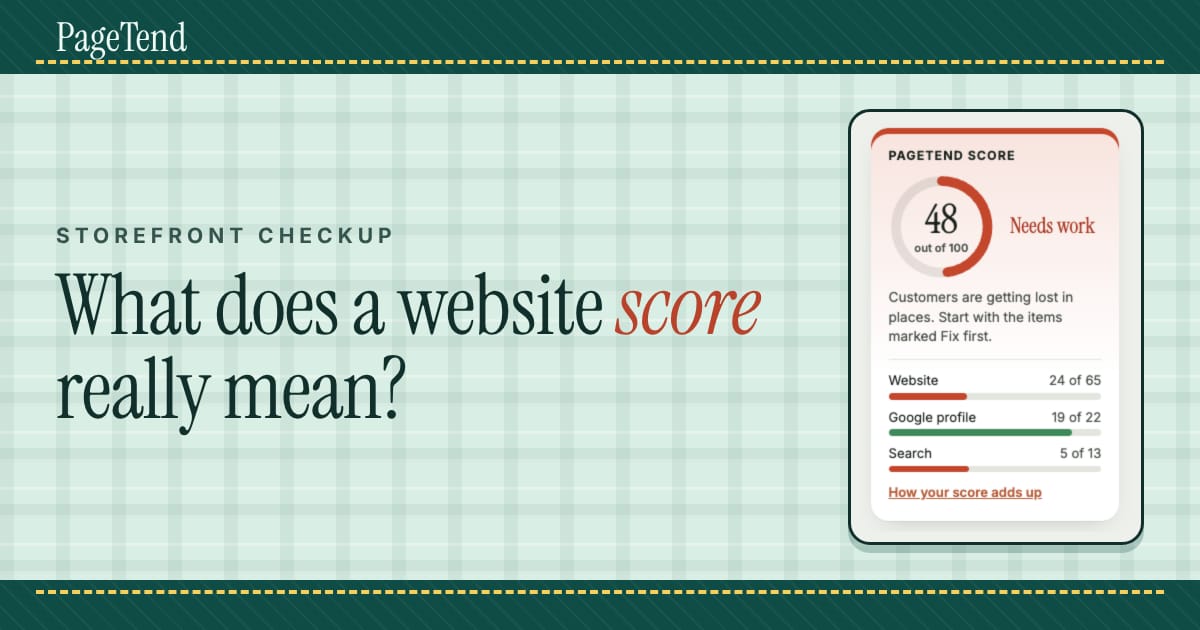
The cover of this post is the score card from a real report we prepared for a local business, with the name hidden. It scored 48 out of 100, which is red.
The sub-scores tell the story better than the total does. The Google profile scored 19 of 22: a perfect rating, real photos, and personal replies to reviews. Customers clearly love this business. The website scored 24 of 65, and search 5 of 13. The site was slow on a phone, the main button led nowhere useful, the phone number was missing and the home page still showed events from months ago.
That gap is the point. Plenty of good businesses have an excellent reputation and a website that works against it, and the owner has never seen it from a customer's side. A single number makes that visible. The finding list under it says what to fix, and in this case most of it was quick edits rather than a rebuild.
What the score is not
It is our own measure, not Google's. Google does not publish a score for your business, and a high number does not guarantee more customers or a higher place in search results. What it does show is whether the things a customer and Google can see are in order, and where the biggest gaps are.
It is also a snapshot. A site that scores 90 today can drift as hours change, events pass and a new photo gets added without a description. That is a good reason to look again now and then, whoever does the looking.
What to do with yours
If you have a report: read the sub-scores first. If one is far below the others, that is where your next hour goes. Then work down the Fix first items, which are sorted so the change that wins back the most customers comes first.
If you do not have one yet, you can order a Storefront Checkup and see where your own site and Google listing stand. The report is yours to keep, whether you fix things yourself, hand it to whoever looks after your site, or ask us.
Questions we hear
Is the score a ranking in Google? No. It is ours, and it measures how ready your website and listing are for a customer who finds you.
Can the same business get different scores on different days? Yes, if something changed, such as a faster site, new reviews or an updated listing. The score reflects the day we checked.
What if the score is low? A low score is a list of things to fix, not a verdict on your business. The report puts the most urgent first and says how to fix each one.
Do I need to give you any passwords? No. We look from the outside, the way a customer and Google do, and nothing on your site or listing is changed.
Written by Frank Yang, founder of PageTend. He has written software for 30 years and builds PageTend with AI, so small businesses never have to think about their websites.
Rather not do any of this yourself?
We build your website, keep it current and look after your Google listing. You email us; we make the change.
More posts
 Moving your Shopify or Etsy shop to your own websiteWhat it takes to move a Shopify store, or bring your Etsy listings, to a shop on your own website: one file, your old links kept, and a preview before you pay.
 Closed for the season? Keep your Google listing honestA garden center, a fishing charter or a holiday attraction can close for months and still be found every day. Here is how to set your Google listing for the off-season, and get it ready to reopen.
 Who owns your website? Domain, hosting and words, explainedYour website is four things, and each can belong to someone different. How to check who holds your domain, hosting and content in ten minutes, and what to ask for.