
Guides · October 26, 2026
Closed for the season? Keep your Google listing honest
A garden center, a fishing charter or a holiday attraction can close for months and still be found every day. Here is how to set your Google listing for the off-season, and get it ready to reopen.
If your business closes for part of the year, your Google listing does not. People still search for you in January: to see when you reopen, to plan a trip, to ask about a deposit, or to buy a gift. What they find on that listing is your answer, whether you wrote it carefully or not.
The goal is simple. Tell people what they can do now, what happens next, and where to find the latest word. Here is how to do that for a garden center, a fishing charter, a summer rental, a holiday attraction or a seasonal restaurant.
Step 1: Pick the status that is true
The most common mistake is choosing the setting that sounds best instead of the one that is accurate. A listing that says "open" to a customer who drives out to a locked gate costs you a review, not just a visit.
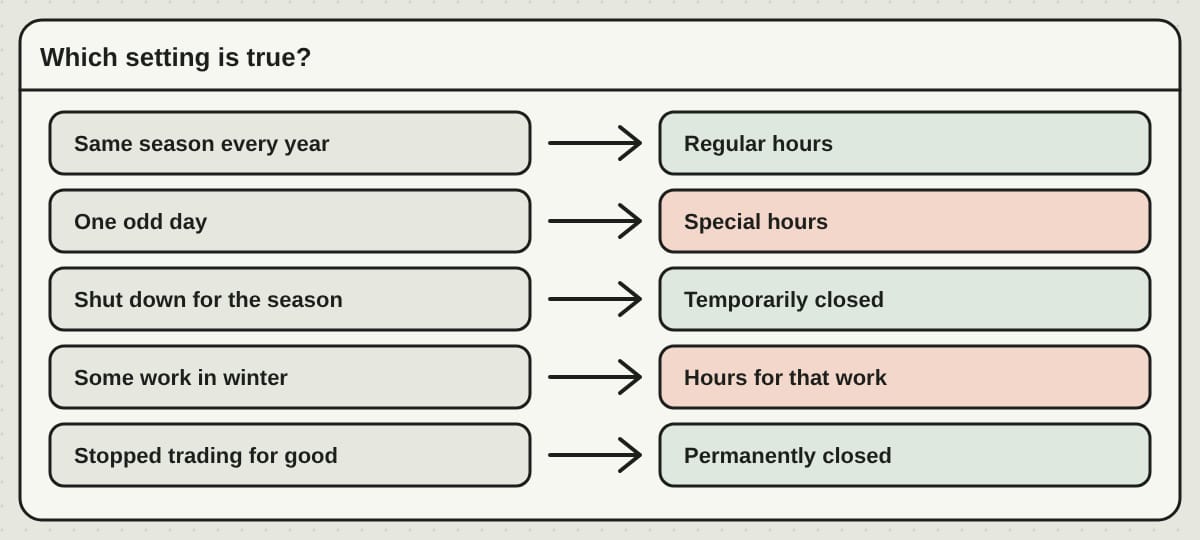
- Open on the same schedule every year. Set your regular hours for when you are open.
- Open, with one odd day. Add special hours for that date.
- Shut down for the whole season. Mark the business temporarily closed. Do not leave a long string of regular hours that are not real.
- Still doing some work in the off-season, such as orders, repairs or bookings by phone. Show hours that match that work.
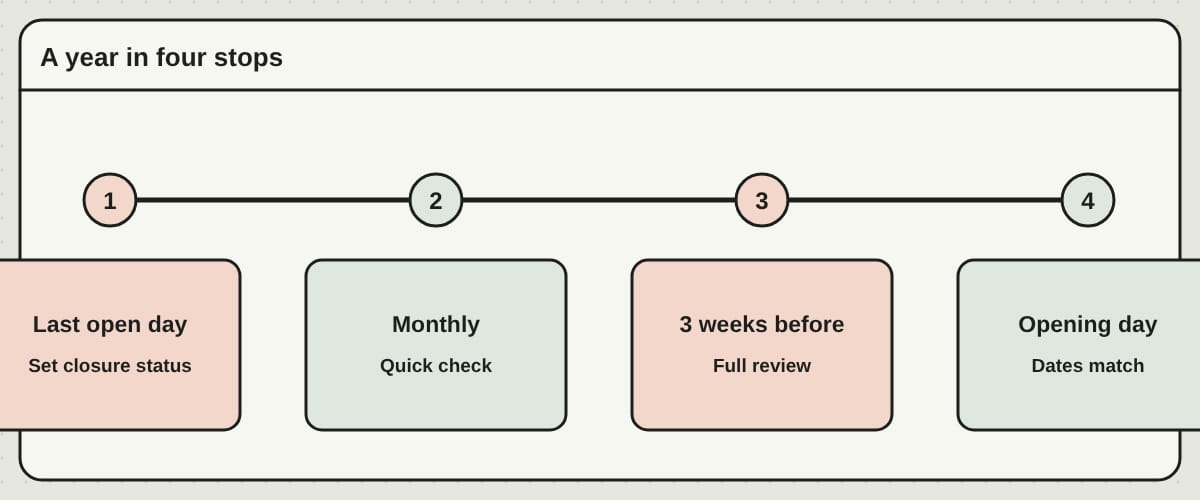
- Gone for good. Only then use permanently closed.
Two more rules. Keep the same listing from year to year, because deleting it each winter and starting over each spring throws away your reviews and photos. And keep your business name as it is. Putting "Opening April 12" in the name does not help, and can get the listing flagged.
One more honest distinction: taking reservations for next summer is not the same as being open today. Explain advance booking on your website. Keep the listing's status true to today.
Step 2: Before you close, leave a trail
Customers who find you closed need a next step. Before the last day, decide what it is: order pickup, a deposit question, a waiting list for next season, an email or a phone number that someone checks.
Use this checklist:
- Set the closure status on your listing.
- Update the home page, booking page and contact details on your website.
- Take down offers that expire, and swap out seasonal banners.
- Say whether you take reservations for next year and how off-season questions are handled.
- Put a reminder in your calendar to review the listing before you reopen.
And do not promise a date you cannot keep. "Expected to reopen in May, dates confirmed here in April" serves people better than a firm date that slips. A post on your listing can explain the situation, but it does not replace the closure status. Many people see only the status and never open your latest post.
Step 3: Say it on your own site first
Your website is the place where you can say more than Google gives you room for: the plan, the date, the booking details, the weather note. Customers who click through from your listing should find the same dates and the same instructions.
If you run a season of events, such as a market, a tasting series or a class schedule, an event calendar keeps the dates in one place. It is a good fit for the custom calendar events feature, where each date has its own page and visitors can subscribe to the calendar.
Step 4: A light check while you are closed
A closed business still needs a few minutes now and then. Pick a recurring reminder, monthly is plenty, and check three things: the hours and status on your listing, any new reviews, and the phone number and email. Check again after any big change, or when Google sends you a notice.
You do not need to post every week in the quiet months. The point of the off-season is to keep old information from becoming the answer people find. Use the time to fix whatever kept confusing customers last year. If people kept calling about parking, age limits or cancellations, make those answers easy to see before the next season.
Fix the basics before you spend money on promotion: the right hours, a working booking link and answers to the questions callers ask. More people finding you does not help if they reach a closed gate or cannot finish a reservation.
Step 5: Three weeks before you reopen
Start your review about three weeks before opening. This is a practical window, not a Google rule, and it leaves time to fix problems.
- Make sure you can sign in. If a former employee or an agency controls the account, sort that out now. Add helpers as managers; do not share a password.
- Check the basics. Name, phone, website link, map pin and address or service area.
- Test the booking link on a phone. A link that still opens last year's schedule can lose a reservation even when everything else looks right.
- Set a confirmed opening date on your site, then update the listing's status to match.
- Add new photos of the entrance, the parking and what visitors will find this year. Last year's pictures can stay if they are still true.
Step 6: In the busy season, one person owns it
When the doors open, the listing is the first thing to slide. Give it one owner and a backup. A short weekly look is enough: what the listing says, holiday hours coming up, new reviews, and whether the booking link works. Check sooner whenever something changes: a different pickup spot, an entrance moved, a weather closure.
Do not assume people will see your Instagram post before they rely on Google Maps.
On reviews: ask for honest ones after real visits. Do not offer a discount for a review, ask only for positive feedback, or steer unhappy customers somewhere else. Reply without giving away private details.
Keep categories and services true to what you really do. Changing them to chase an unrelated seasonal search can make the listing less useful and risks breaking Google's rules.
Comparing one season with the next
Months of a seasonal business cannot be compared month to month. A beach rental will look very different in January and July. Compare the same stage of the season instead: the four weeks before opening, or the first full month open.
Google's own numbers (calls, website visits and directions from your listing) are a guide, not a record of sales. Put them next to your own bookings. And keep a simple log of opening dates, big changes and odd conditions. A weather closure or a new attraction down the road can move your numbers without anything you did on the listing.
Questions we hear
Is a Google Business Profile free for a seasonal business? Yes. Creating and managing one is free. A provider may charge to manage it for you, and ads are separate. Paying someone to manage it does not buy a better spot on the map.
Should I mark my business permanently closed every winter? No. Use temporary closure for a seasonal shutdown. Permanent closure is only for a business that has stopped trading.
Can I take bookings while I am marked temporarily closed? You can explain advance bookings on your website and give a working way to reserve. Keep the listing's status true to what you are doing today.
Is there still a Google My Business app? The standalone app was retired. Owners manage their profile through Google Search and Google Maps while signed in to an account with access.
How often should I check? Weekly in the busy season, monthly while closed. Those are good habits, not Google rules.
If you would rather hand it off
The system that works is one you can keep up: a named owner, a calendar of dates and one list of confirmed changes. If you would rather not run it yourself, our Google profile service keeps holiday hours and temporary closures in step with your website from one record, enters holiday hours a month ahead, replies to every review within two business days, and watches for edits you did not make. You can also email us the date and we update the website within one business day; no portal needed.
Written by Frank Yang, founder of PageTend. He has written software for 30 years and builds PageTend with AI, so small businesses never have to think about their websites.
Rather not do any of this yourself?
We build your website, keep it current and look after your Google listing. You email us; we make the change.
More posts
 Who owns your website? Domain, hosting and words, explainedYour website is four things, and each can belong to someone different. How to check who holds your domain, hosting and content in ten minutes, and what to ask for.
 Website design and hosting: bundled or bought separately?Builder, designer plus host, or one company that runs it all? The price tags differ, but the real question is who does the work after launch day.
 One website, every language your customers speakA PageTend website can speak English, Chinese and Spanish, with a language switch in the header, its own address for each language, and every date, button and form switching along.